Project Schedule (Gantt)
Phase: Planning | Audience: Shared | Project: WEB-2026-01 Corporate Website Development
Understand it first
In simple words: The Project Schedule shows every task with start and end dates, who does it and what it depends on. The Gantt chart is the visual version. The critical path shows the tasks that decide the finish date.
Think of it like: A wedding day timeline: hall decoration must finish before guests arrive; the photographer must arrive before the ceremony. Any delay in the key steps delays the whole event.
When is it created? | Planning (9 Oct 2026), updated weekly |
Who prepares it? | Project Manager |
Who approves or uses it? | Shared with and agreed by the client |
What happens next? | Progress is tracked against it every week |
How it connects to other documents
- Tasks come from the WBS.
- Milestones trigger payments in the Invoice Tracker.
- Progress against it gives SPI in the EVM tracker.
The sample document
Below is the actual document for project WEB-2026-01. Read the purpose first, then go through each numbered section.
Issued by: [Your Company] Technologies Pvt. Ltd.
Purpose: Task-level schedule with dates, dependencies and owners. This is the schedule baseline.
Item | Detail |
Document no. | WEB-2026-01/SCH |
Version | 1.0 |
Date | 9 Oct 2026 |
Owner | Project Manager |
Audience | Shared with client |
Phase | Planning |
Status | Approved |
1. Milestones
Milestone | Date | Linked payment |
Kickoff | Mon 5 Oct 2026 | M1 advance received |
Sitemap approved | Wed 14 Oct 2026 | |
Design sign-off | Fri 30 Oct 2026 | M2 30% |
Staging site ready | Fri 27 Nov 2026 | |
UAT sign-off | Fri 4 Dec 2026 | M3 30% |
Go-live | Wed 9 Dec 2026 | |
Handover complete | Fri 11 Dec 2026 | M4 10% |
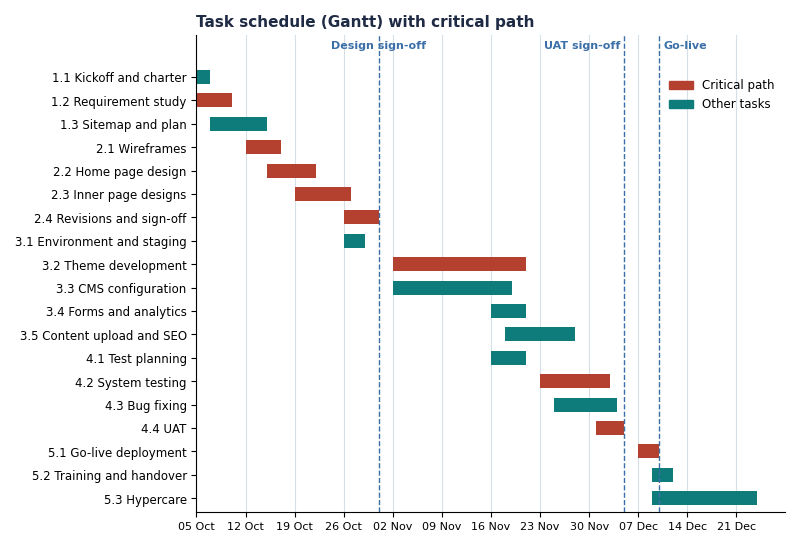
2. Task schedule
WBS | Task | Start | Finish | Predecessor | Owner |
1.1 | Kickoff and charter | 5 Oct | 6 Oct | PM | |
1.2 | Requirement study | 5 Oct | 9 Oct | PM | |
1.3 | Sitemap and project plan | 7 Oct | 14 Oct | 1.2 | PM |
2.1 | Wireframes | 12 Oct | 16 Oct | 1.2 | Designer |
2.2 | Home page design | 15 Oct | 21 Oct | 2.1 | Designer |
2.3 | Inner page designs | 19 Oct | 26 Oct | 2.2 | Designer |
2.4 | Revisions and sign-off | 26 Oct | 30 Oct | 2.3 | Designer |
3.1 | Environment and staging | 26 Oct | 28 Oct | 1.3 | Backend |
3.2 | Theme development | 2 Nov | 20 Nov | 2.4, 3.1 | Frontend |
3.3 | CMS configuration | 2 Nov | 18 Nov | 2.4, 3.1 | Backend |
3.4 | Forms and analytics | 16 Nov | 20 Nov | 3.3 | Backend |
3.5 | Content upload and SEO | 18 Nov | 27 Nov | 3.2, 3.3 | Content |
4.1 | Test planning | 16 Nov | 20 Nov | 1.3 | QA |
4.2 | System testing | 23 Nov | 2 Dec | 3.2, 4.1 | QA |
4.3 | Bug fixing | 25 Nov | 3 Dec | 4.2 | Frontend |
4.4 | UAT | 1 Dec | 4 Dec | 4.2 | PM + client |
5.1 | Go-live deployment | 7 Dec | 9 Dec | 4.4 | Backend |
5.2 | Training and handover | 9 Dec | 11 Dec | 5.1 | PM |
5.3 | Hypercare | 9 Dec | 23 Dec | 5.1 | Backend |
3. Critical path
1.2 → 2.1 → 2.2 → 2.3 → 2.4 → 3.2 → 4.2 → 4.4 → 5.1. Any delay to these tasks delays go-live. Design sign-off on 30 Oct is the most sensitive date because development cannot start without it.
Note: Diwali falls in week 6 (8 Nov). Developer availability that week is planned at 60%; theme development runs to 20 Nov to absorb this.
WEB-2026-01/SCH · v1.0 · Shared with client. Bracketed items such as [Client Name] are placeholders.
Key takeaways
- Know your critical path; protect those tasks first.
- Plan for holidays and reduced capacity (Diwali week here).
- Milestones linked to payments must be realistic.
Common mistakes to avoid
- Ignoring dependencies between tasks.
- No buffer before key dates like UAT.
- Not updating the schedule when reality changes.
Next lesson: 17. Project Budget (Cost Baseline)